Pular para o conteúdo principal

Compartilhe

Namechk, você pode verificar a disponibilidade de um nome de usuário ou domínio em segundos.

Com o Namechk, você pode verificar a disponibilidade de um nome de usuário ou domínio em segundos. Existem 351 milhões de nomes de domínio registrados, e esse número continua crescendo. Todos os dias, milhares de novos nomes são registrados. Como os nomes de domínio só podem ser usados ​​por uma empresa ou pessoa por vez, pode ser difícil não apenas criar um nome de domínio que faça sentido, mas também encontrar um que esteja disponível.  Muita gente não quer perder tempo criando um novo nome de usuário, verificando a disponibilidade e registrando-o em cada plataforma. E se houvesse um jeito mais fácil? Existe. Um verificador e gerador de nomes de usuário como o Namechk  pode ajudar. Como funciona o Namechk? Comece com algumas ideias de nomes e digite cada uma delas na barra de pesquisa. O Namechk pega sua ideia de nome de usuário (mesmo palavras aleatórias) e verifica sua disponibilidade como nome de domínio e nome de usuário em dezenas de redes sociais e plataformas online. ...

Sputnik — An Open Source Intelligence Browser Extension

Sputnik — An Open Source Intelligence Browser Extension

Summary

Sputnik is a browser extension which I designed to quickly and easily search IPs, Domains, File Hashes, and URLs using free Open Source Intelligence (OSINT) resources.
As an Incident Response Analyst, this tool has enabled streamlined pivoting on artifacts gathered during investigations. Being able to quickly gather OSINT helps provide context to an investigation and can help when developing a narrative for an incident.
I designed this with convenience and efficiency in mind. In order to use the extension, simply highlight the artifact you wish to search and right click to choose an OSINT tool. You can also right click on hyperlinks, images, audio, and video content and the domain will be extracted from these artifacts. In most cases, you will be redirected straight to results. For tools that require user interaction such as captchas, the highlighted artifact is saved to your clipboard and you will be directed to the submission page to paste the selected artifact.
Sputnik is available for free:
Below are some examples and code snippets to explain how it works.
Skip to the end for screenshots of the extension in both browsers.

Design Samples

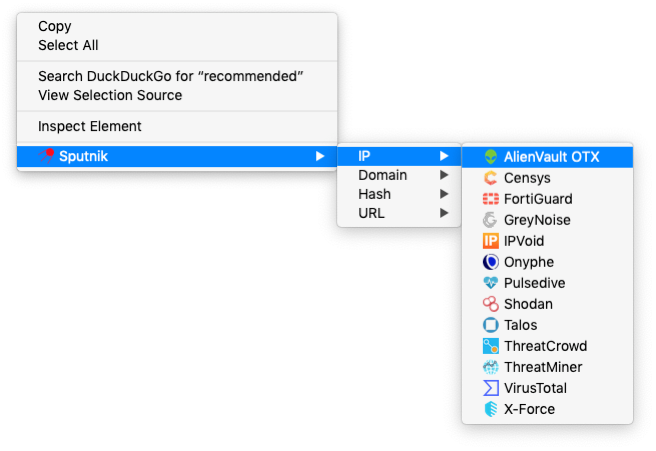
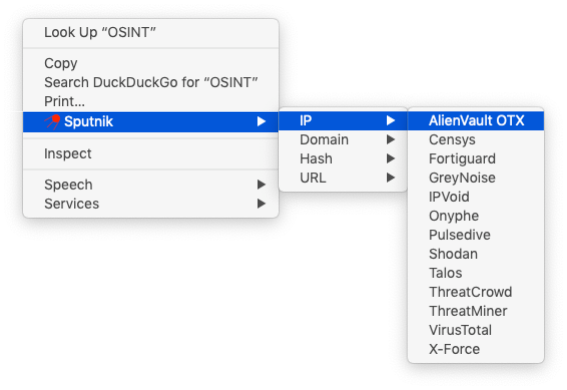
Sputnik is implemented as a Context Menu item in Firefox and Chrome. Context Menus are the interface windows in browsers that appear with right clicks such as:
Example Context Menu
A context menu browser extension typically has 2 basic components:
  1. A manifest to store metadata such as version number and permissions.
  2. A javascript file to implement the functionality of the extension.

Manifest

A typical manifest for a browser extension looks something like this:
Sputnik Manifest
As you can see, this contains information such as a brief description, a path to the icon file, a version number, and a set of permissions. In order to implement the menu items in Firefox and Chrome, I had to use each browser’s supported API/framework in order to leverage as much built-in functionality as possible and avoid reinventing the wheel.

Context Menu Functionality

I chose to separate the OSINT sources into their own sub-menus by artifact type (IPs, Domains, File Hashes, and URLs). To do this, I used parent/child menus:
Firefox Context Menu
To launch the chosen OSINT resource, I simply used a switch statement to set the url that will be opened. For tools that supported the artifact in their URL, I appended the selected text after the search link.
Context Menu Functionality

Clipboard Write

Firefox has built-in functionality for writing to the clipboard that is simple to implement:
navigator.clipboard.writeText(info.selectionText);
Although Chrome grants permissions for clipboard write access, there is currently no built-in supported functionality to write to the clipboard. I was able to implement a JavaScript function that wrote text to the clipboard:
Chrome Clipboard Write
The function is invoked to write selected text to the clipboard using:
copyStringToClipboard(info.selectionText);
Visit Sputnik’s GitHub for all of the code to both the Firefox and Chrome extensions! This project has already received amazing suggestions and input from the Open Source community and I look forward to making this tool even better alongside fellow users.

Firefox

Available through Mozilla at the Firefox Add-Ons store.
Firefox Demo

Chrome

Available through the Chrome Web Store.
Chrome Demo

Comentários

Como usar um Agente OSINT IA

Pericia Digital

Ebook

Postagens mais visitadas